MT4 and MT5 Brokers: Compare Account and Platform Access
MetaTrader 4 and MetaTrader 5 are the most widely used electronic trading platforms in forex and CFD markets. If you're selecting a broker based on platform access, knowing which ones offer MT4, MT5, or both matters directly. Seven brokers in the WhatBroker catalog explicitly provide both platforms: IC Markets, OANDA, FxPro, Pepperstone, Exness, AvaTrade's platform offerings, and Tickmill. This directory identifies those brokers and explains the platform differences that affect your choice.
Key takeaways: MetaTrader platform availability
- Seven brokers in the WhatBroker catalog offer both MetaTrader 4 and MetaTrader 5: IC Markets' trading platforms, OANDA, FxPro, Pepperstone, Exness, AvaTrade, and Tickmill.
- MT5 supports more asset classes, stocks, futures, bonds, and provides more technical indicators than MT4. MT4 remains widely used for forex-focused trading.
- Expert Advisors written for MT4 in MetaQuotes Language 4 (MQL4) don't work on MT5 without recompilation or rewriting, as MT5 uses MQL5.
- Platform availability varies by account type and regulatory jurisdiction. Verify your chosen MetaTrader version works with your intended account structure before opening one.
- Demo accounts typically mirror live account platform access, letting you test features before committing capital.
What it means: MetaTrader 4 vs. MetaTrader 5
MetaTrader 4 is an electronic trading platform designed primarily for forex and CFD trading. It offers charting tools, technical analysis features, and support for automated trading through Expert Advisors written in MQL4. MT4's been the industry standard for retail forex traders for over two decades.
MetaTrader 5 is the successor platform. Expanded functionality.
MT5 supports additional asset classes including stocks, futures, bonds, and commodities, depending on broker implementation. It provides more built-in technical indicators, additional chart timeframes (21 versus MT4's 9), and advanced order types such as Buy Stop Limit and Sell Stop Limit. Native Depth of Market (DOM) functionality in MT5 shows the volume of buy and sell orders at different price levels, offering visibility into market liquidity that MT4 doesn't natively provide.
Why it matters: Platform choice affects your trading toolset
Your choice of MetaTrader platform directly influences which trading tools, instruments, and automation methods are available.
Forex traders who use established MQL4 Expert Advisors or prefer a simpler interface often find MT4 sufficient and avoid the need to convert or rewrite their automated systems. Multi-asset traders who plan to trade stocks, futures, or other instruments beyond forex will benefit from MT5's broader instrument support and analytical depth. Algorithmic traders must evaluate whether their existing EAs can be ported to MT5 or whether they prefer to remain on MT4, as rewriting code in MQL5 represents a significant time and resource investment.
Platform availability also varies by account type and regulatory jurisdiction, so verifying compatibility with your specific account is essential before opening one. For detailed account-specific platform compatibility, refer to the guide on trading platform compatibility and broker account types.
How it works: Brokers offering MetaTrader 4 and 5
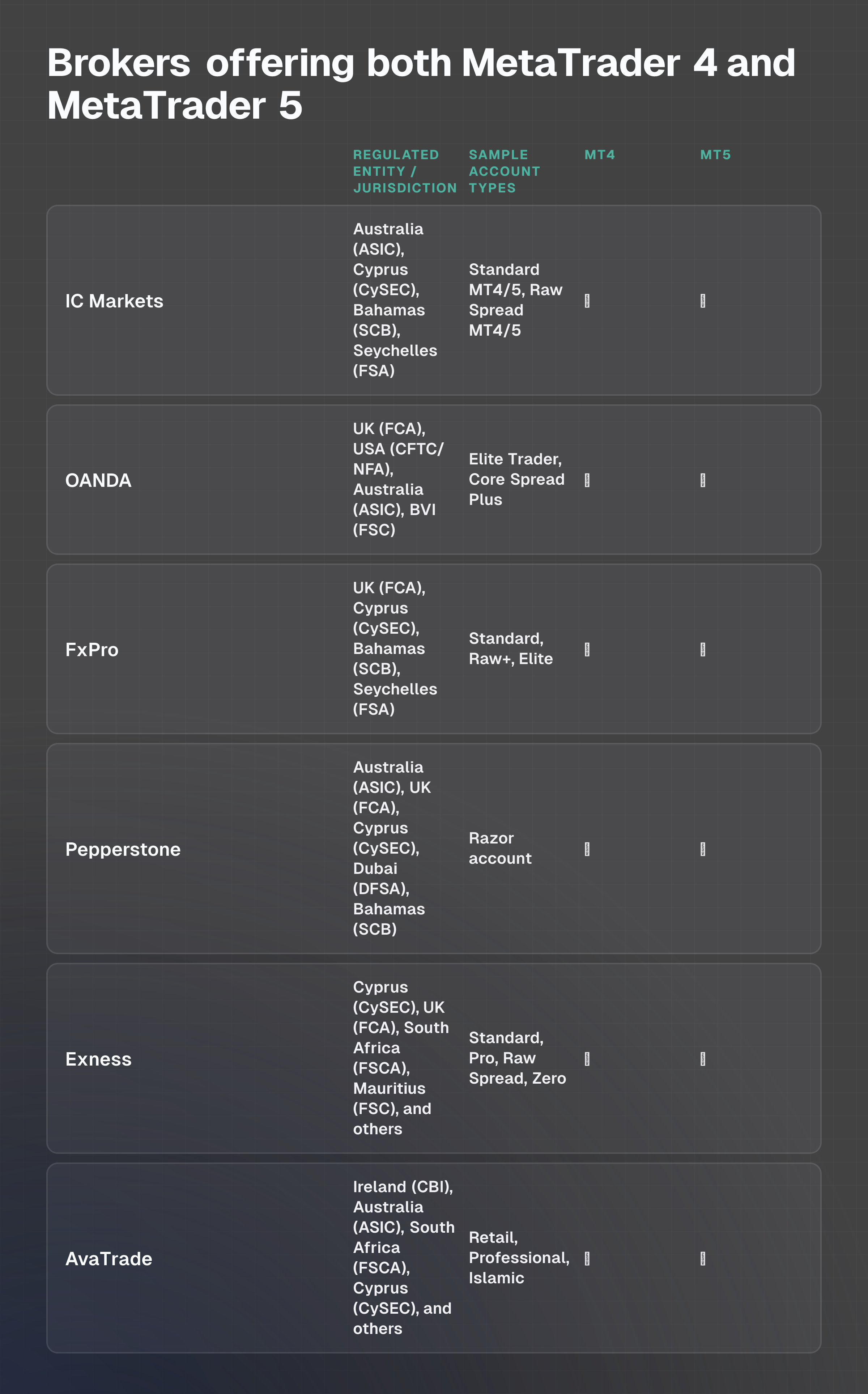
The table below lists brokers in the WhatBroker catalog that explicitly offer MetaTrader 4, MetaTrader 5, or both as available trading platforms.
| Broker | Regulated Entity / Jurisdiction | Sample Account Types | MT4 | MT5 | Source |
|---|---|---|---|---|---|
| IC Markets | Australia (ASIC), Cyprus (CySEC), Bahamas (SCB), Seychelles (FSA) | Standard MetaTrader 4/5, Raw Spread MetaTrader 4/5 | ✓ | ✓ | IC Markets official site |
| OANDA | UK (FCA), USA (CFTC/NFA), Australia (ASIC), BVI (FSC) | Elite Trader, Core Spread Plus | ✓ | ✓ | OANDA official site |
| FxPro | UK (FCA), Cyprus (CySEC), Bahamas (SCB), Seychelles (FSA) | Standard, Raw+, Elite | ✓ | ✓ | FxPro official site |
| Pepperstone | Australia (ASIC), UK (FCA), Cyprus (CySEC), Dubai (DFSA), Bahamas (SCB) | Razor account | ✓ | ✓ | Pepperstone official site |
| Exness | Cyprus (CySEC), UK (FCA), South Africa (FSCA), Mauritius (FSC), and others | Standard, Pro, Raw Spread, Zero | ✓ | ✓ | Exness official site |
| AvaTrade | Ireland (CBI), Australia (ASIC), South Africa (FSCA), Cyprus (CySEC), and others | Retail, Professional, Islamic | ✓ | ✓ | AvaTrade official site |
| Tickmill | UK (FCA), Cyprus (CySEC), South Africa (FSCA), Seychelles (FSA) | Classic Account, Raw Account | ✓ | ✓ | Tickmill official site |
All seven brokers listed provide access to both MetaTrader 4 and MetaTrader 5 across their core account offerings. Specific account types and regulatory entities may support different platforms or instruments; checking directly with your chosen broker ensures your account type is compatible with your preferred platform.
Example or scenario: Comparing platform choice for two traders
Scenario 1: Forex trader with existing EAs
Sarah trades primarily EUR/USD and GBP/USD using three custom Expert Advisors she developed in MQL4 over the past five years. She's also built a library of MT4 indicators tailored to her strategy.
She opens a Standard account with IC Markets, which offers both MT4 and MT5. She chooses MT4 because her EAs and indicators work without modification, allowing her to deploy her strategy immediately without investing time in code conversion or learning a new platform interface.
Scenario 2: Multi-asset trader evaluating liquidity insight
James wants to trade forex during London hours and add stock CFDs to his portfolio. He is drawn to advanced order types and needs to see Depth of Market data to understand liquidity at different price levels before placing large orders. He opens a Razor account with Pepperstone and selects MT5, where DOM is natively available and where stock CFDs can be accessed through the same platform. The additional technical indicators and 21 chart timeframes in MT5 also support his multi-timeframe analysis approach.
Both traders benefit from platform choice aligned to their specific needs, demonstrating why platform compatibility and feature matching are critical during broker selection.
Common mistakes or risks: What to avoid when selecting MetaTrader platforms
EA incompatibility assumption
A frequent mistake is assuming MT4 Expert Advisors will work on MT5 without modification. MQL4 and MQL5 are distinct programming languages; existing EAs must be recompiled or rewritten. Traders heavily reliant on custom or purchased EAs should verify that the broker supports their current platform or budget for conversion costs before switching.
Overlooking instrument availability
Choosing MT4 solely because it's familiar, without checking whether your broker offers the asset classes you need on that platform, can limit your trading scope. If you plan to trade stocks or futures, verify that your broker supports those instruments on MT4 before committing; many brokers restrict certain asset classes to MT5 or offer them only on specific account types.
Not testing on a demo account
While demo accounts typically replicate live platform functionality, broker-specific implementations can differ slightly. Always test your chosen platform on a demo account to confirm that available instruments, execution, and spreads match your expectations before trading with real capital.
Ignoring account-type restrictions
Some brokers tie platform availability to account type or regulatory jurisdiction. Selecting MT5 without confirming that your intended account type supports it can result in discovering incompatibility after account opening. Verify platform access at the account-type level with your broker before proceeding.
Dismissing MT4 due to age
While MT5 is newer and more feature-rich, MT4 remains robust and widely supported for forex trading. Dismissing it simply because it's older can mean abandoning a proven, stable environment unnecessarily. Choice should be based on your trading needs, not platform age.
How to choose or what to do next: Decision framework
Step 1: Define your trading focus
Forex only? MT4 remains a solid, proven choice with deep broker support and a mature ecosystem of EAs and indicators.
Forex plus stocks or futures? MT5 is necessary, as many brokers restrict these asset classes to MT5 or make them available only there.
Multi-asset or advanced analysis? MT5 offers more technical indicators, additional chart timeframes, and advanced order types.
Step 2: Assess your automation needs
If you use existing MT4 Expert Advisors, verify that your target broker supports MT4 and that converting your EAs to MQL5 isn't a practical option. If you're building new automated strategies, consider whether MT5's broader asset class support aligns with your long-term trading expansion plans.
Step 3: Confirm account-type and jurisdiction compatibility
Different brokers, and even different regulated entities within the same broker, may offer varying platform access. Check your broker's documentation for your specific account type and regulatory jurisdiction to ensure platform availability.
Step 4: Test on a demo account
Open a demo account with your chosen broker on your preferred MetaTrader platform. Test order execution, chart functionality, available indicators, and any instruments you plan to trade in live conditions. This step catches compatibility issues before real capital is at risk.
Step 5: Verify platform delivery methods
Confirm that your broker offers your chosen MetaTrader version on the devices you'll use: desktop (Windows or Mac), web (WebTrader), or mobile (iPhone, iPad, or Android). Not all brokers provide all versions across all platforms.
Frequently asked questions
Can I use the same Expert Advisor on both MT4 and MT5?
No. MT4 uses MetaQuotes Language 4 (MQL4) and MT5 uses MetaQuotes Language 5 (MQL5). The two languages aren't directly compatible. Existing MT4 EAs must be recompiled or rewritten to function on MT5. Many brokers and third-party developers offer conversion services, but this requires time and verification that the rewritten code behaves as intended.
Which MetaTrader platform has more technical indicators?
MetaTrader 5 generally provides a more extensive set of built-in technical indicators and graphical objects compared to MT4. MT5 also offers 21 default chart timeframes versus MT4's 9, providing greater granularity for technical analysis. However, both platforms support custom indicators, so availability of third-party tools also depends on the trading community and your broker's offering.
Does platform availability differ by account type?
Yes. Brokers often tie platform access to specific account types or regulatory entities. Some brokers may offer MT4 and MT5 on Standard accounts but restrict MT5 to Raw Spread accounts, or vice versa. Always check your broker's account documentation for your specific account type and regulated jurisdiction to confirm platform access before opening an account.
What is Depth of Market (DOM) and why does it matter?
Depth of Market shows the volume of buy and sell orders queued at different price levels above and below the current market price. It provides visibility into market liquidity and can help you assess slippage risk for large orders. MT5 has native DOM support; MT4 doesn't. If you trade large positions or need to understand liquidity dynamics, MT5 may be preferable.
Can I switch between MT4 and MT5 on the same account?
In most cases, yes. Many brokers allow you to run both MT4 and MT5 on the same trading account, or to toggle between platforms. This varies by broker and account type. Check with your broker to confirm whether you can maintain multiple MetaTrader terminals simultaneously or whether you must choose one platform per account.
What if my broker only offers MT4, not MT5?
If you require MT5's features, such as multi-asset support or advanced order types, and your broker doesn't offer it, you may need to consider switching brokers or remaining on MT4. Before deciding, verify whether your trading strategy actually requires MT5 features or whether MT4 meets your needs sufficiently. Many successful traders continue to use MT4 profitably.